Send “Bring Car”.
Use a preset in BOSS or its Home Screen widget when you are ready to request pickup.
For your driver. For your assistant.
The conversation matters. So does what comes next. Ask your driver to bring the car before the meeting ends—with a ready-to-send request.
No number to dial. No routine instruction to type. See when your driver acknowledges, then when they report they have arrived.
3 calendar months free · No card required
Android is currently available to approved closed-test participants.
The moment BOSS was made for
You know you will need the car. Calling means dialing, waiting and speaking in the middle of a conversation. Leaving the request until afterwards means starting that process at the door.
Use a preset in BOSS or its Home Screen widget when you are ready to request pickup.
Your driver receives the request and acknowledges it. BOSS shows their response, so you do not have to assume a message was seen.
Your driver can send an arrival update from BOSS. You decide when to leave the meeting and head to the pickup point.
Explore the actual app
Select a situation to see the screen behind it. These are real app screens with demonstration accounts.
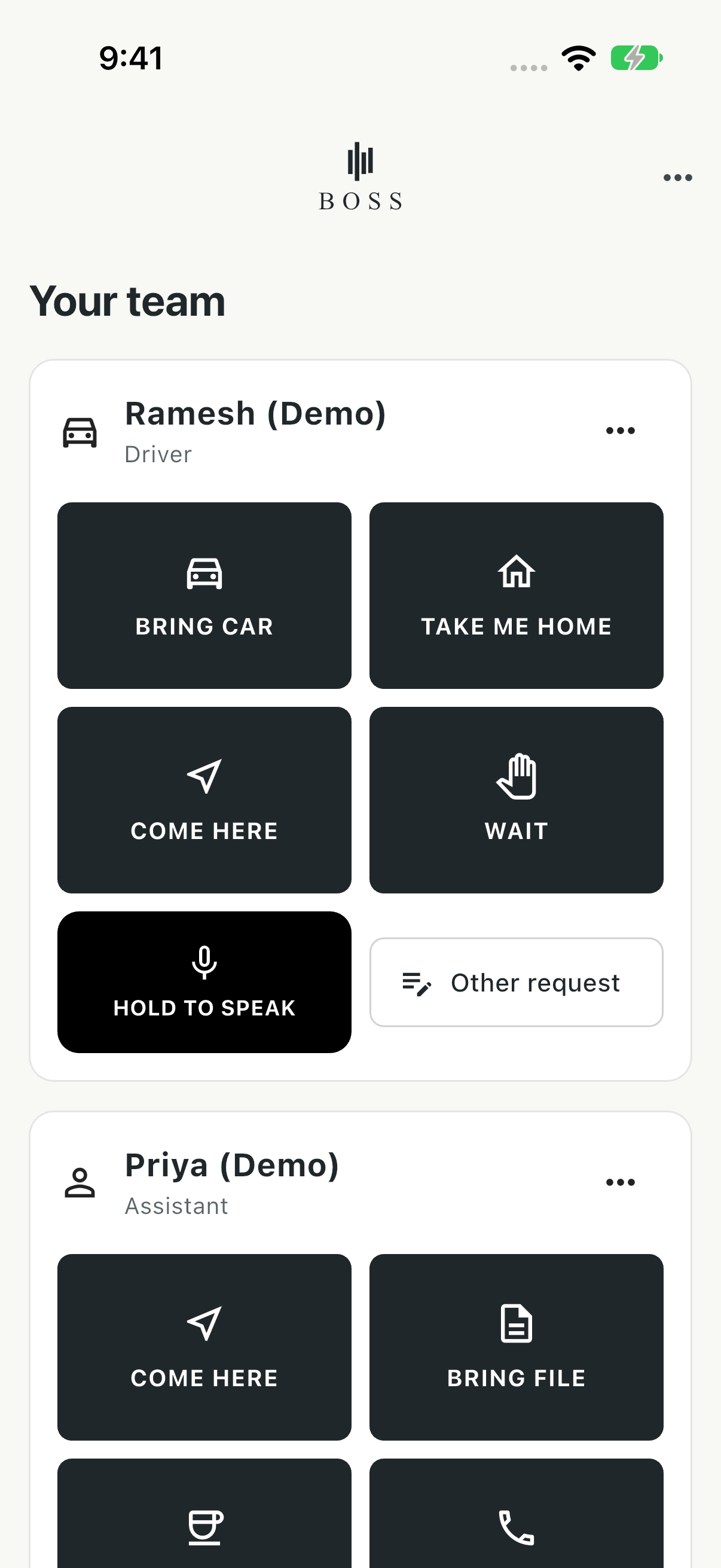
“Bring Car.” “Take Me Home.” “Come Here.” Choose your driver’s request without composing the same message again.
Send before the meeting finishes, then look for their response. Sending a request is separate from the driver acknowledging it.
Named employee · Clear requestYour driver sees what you are asking for: “Bring Car”. A clearly labelled acknowledgement lets them respond.
This full-screen request appears inside BOSS. Lock Screen notifications are presented by the phone and depend on its settings.
Clear instruction · Explicit acknowledgement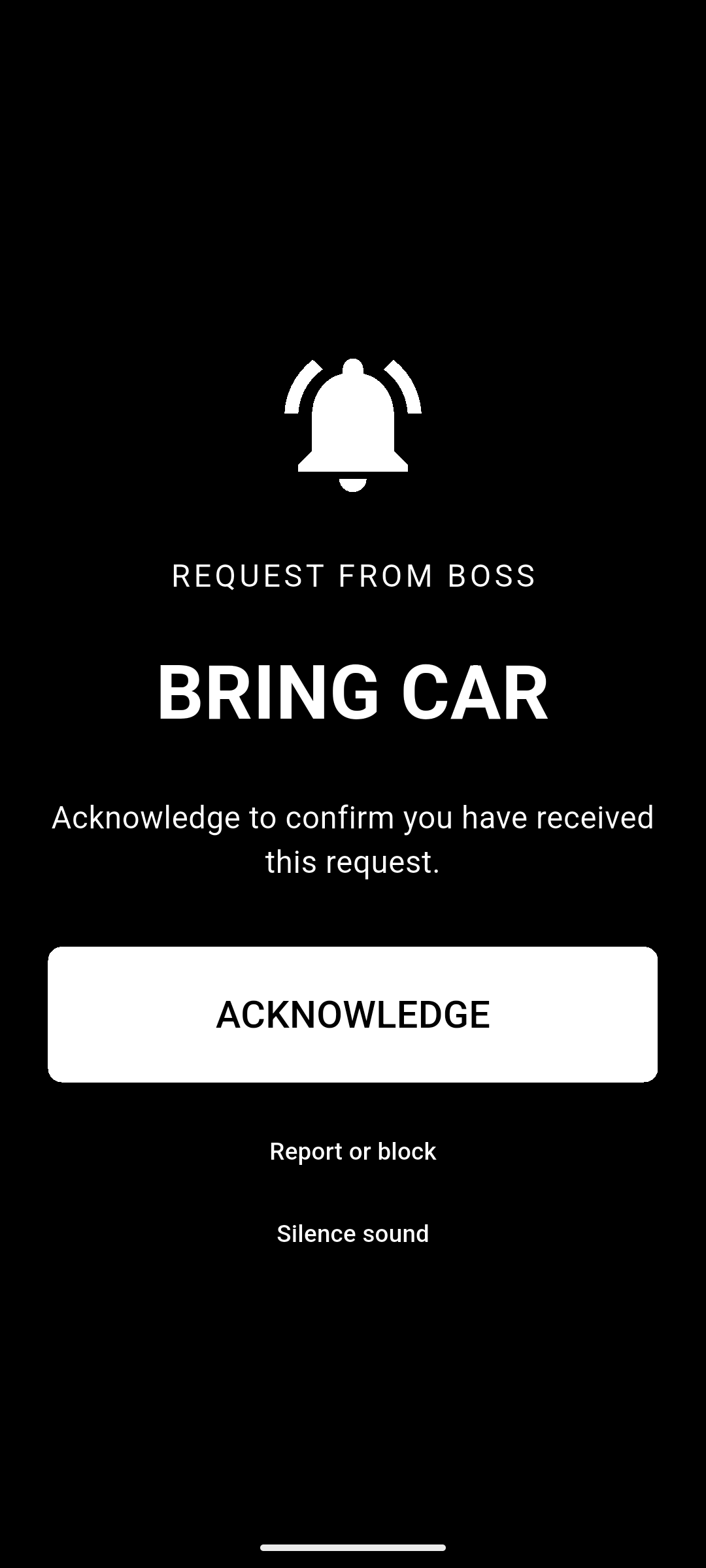
Acknowledgement tells you the request was seen. “I have arrived” lets your driver tell you they have reached the pickup point.
BOSS surfaces that update while you are using the app. Arrival is reported by the employee; it is not GPS tracking.
Acknowledged → Arrived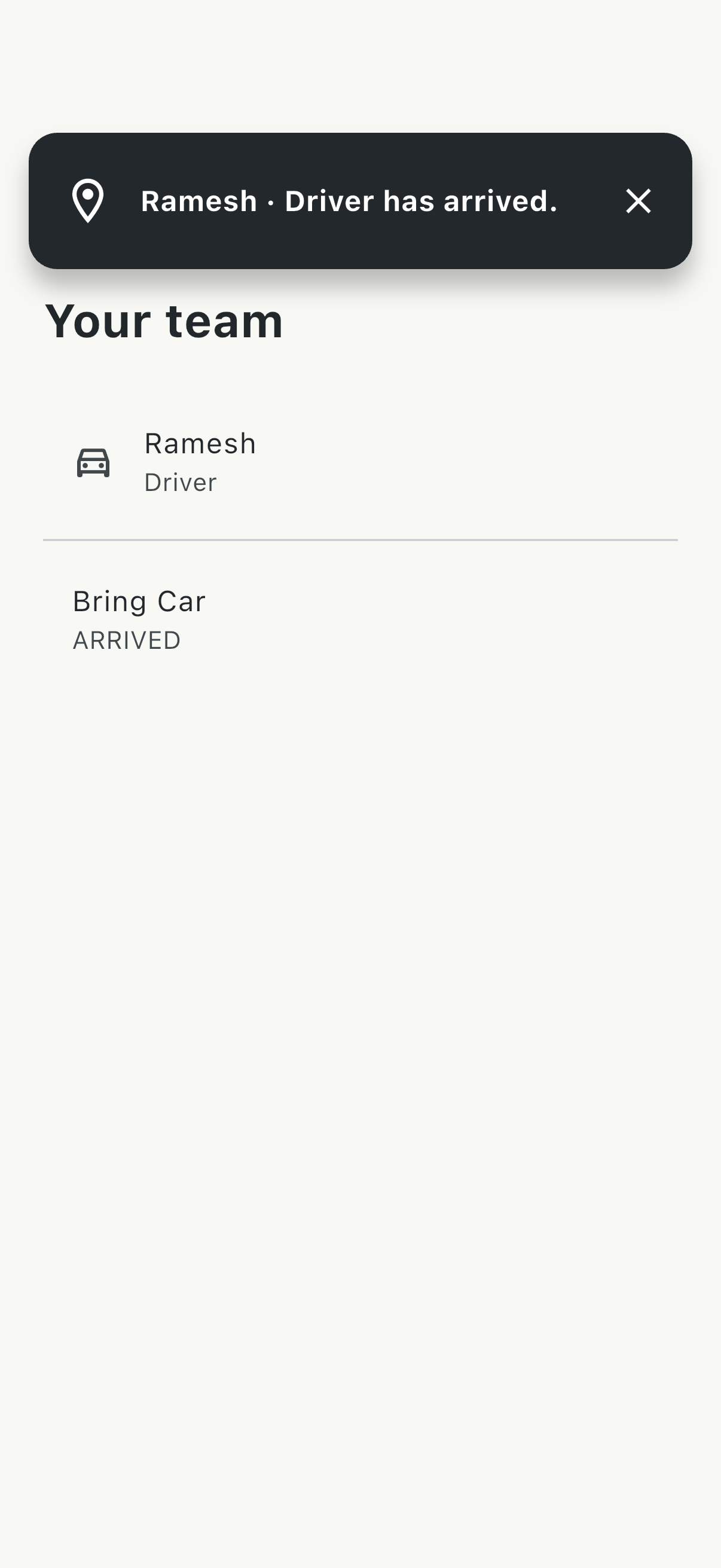
Send “Coffee”, “Bring File” or “Come Here” to your assistant. Keep a routine request short and clear.
For something specific—water for guests or stationery for the room—hold to speak in the app and release to send a voice instruction when it is appropriate to speak.
Presets for routines · Voice for details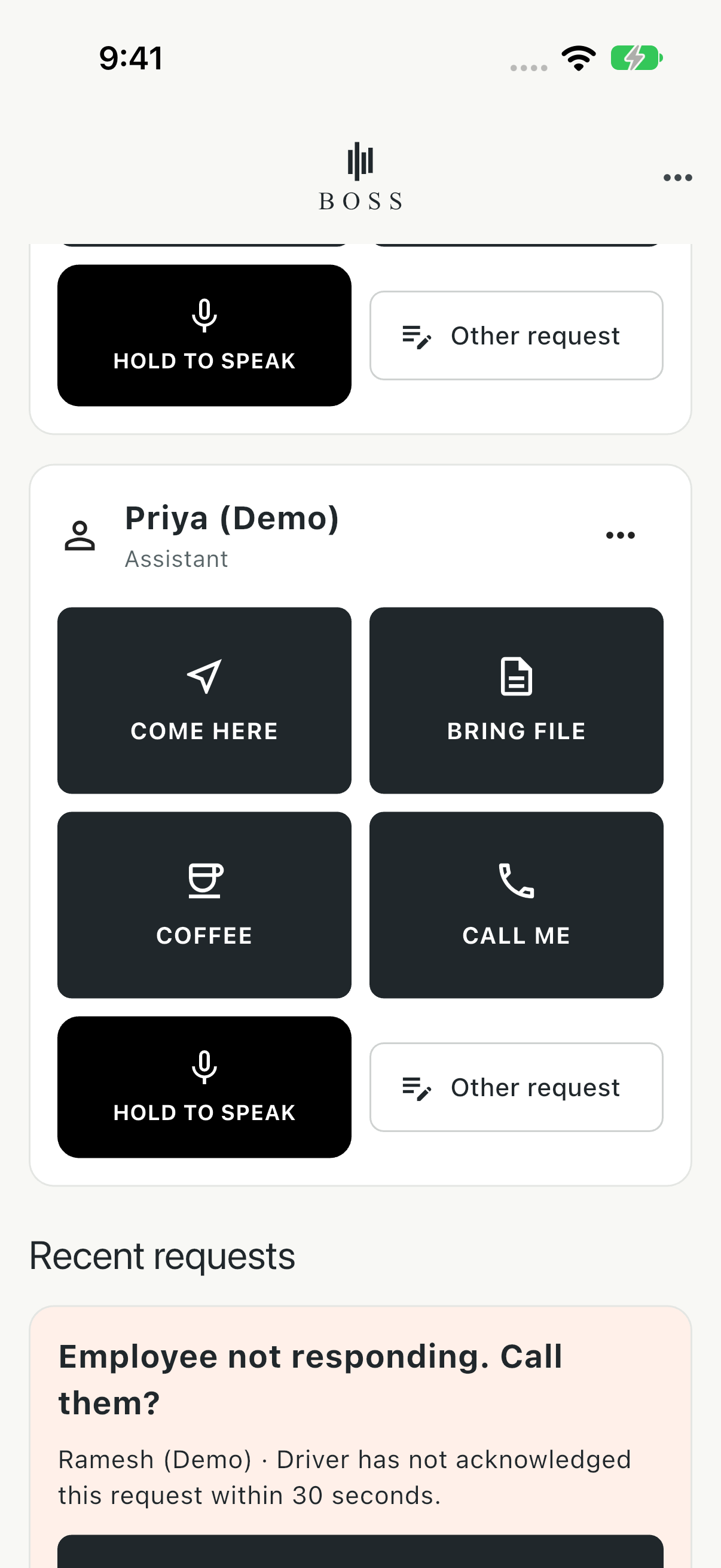
Keep your driver and assistant’s requests on the Home Screen. Tap a preset to send it without opening BOSS.
Employee names and roles help you choose the right person. The voice shortcut opens BOSS for recording; it does not record inside the iPhone widget.
Your people · Your everyday requests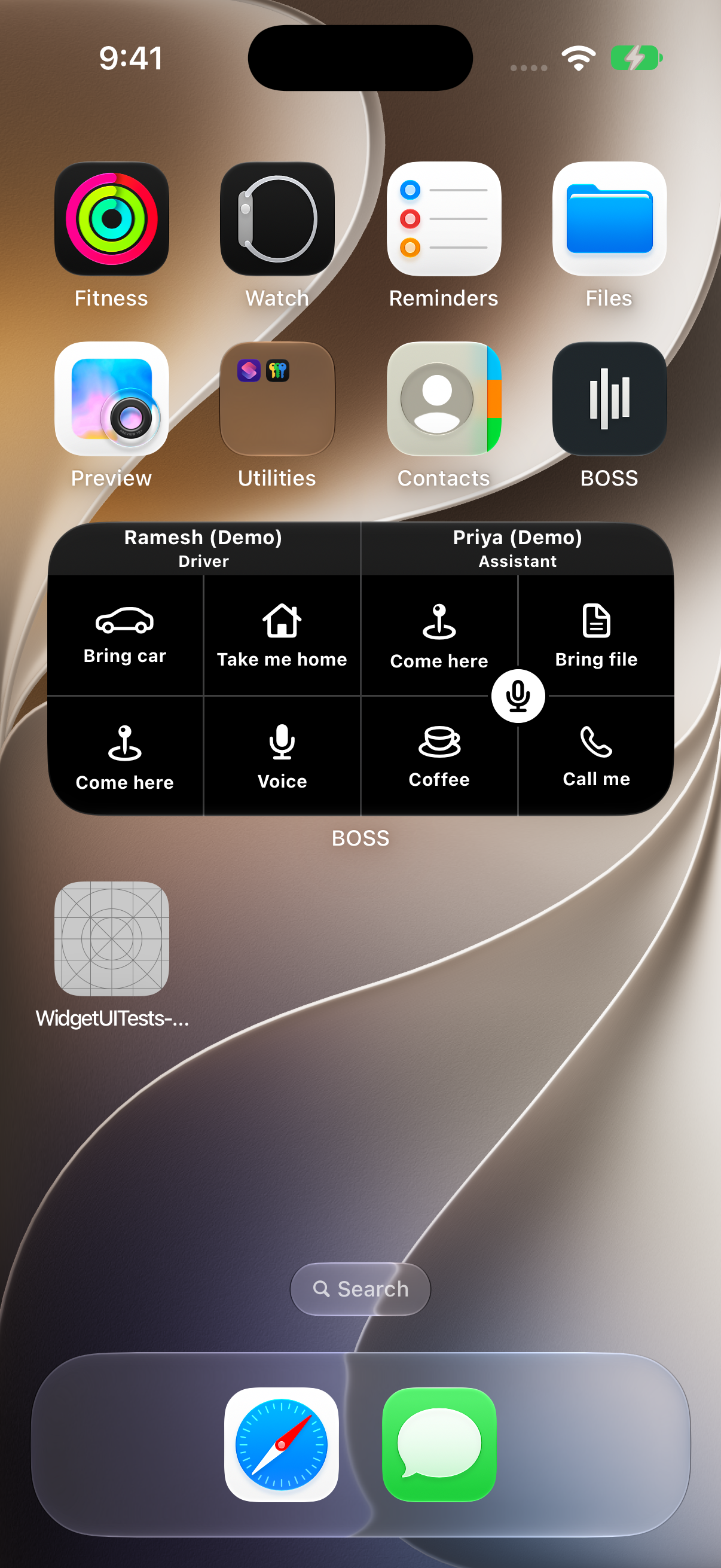
Watch the everyday moments
Short, silent illustrated walkthroughs using real demo screens. Watch with the controls below; these are scenarios, not live delivery-speed recordings.
01 / ASK BEFORE YOU LEAVE
Send a clear request to your driver and see their acknowledgement before making your next move.
02 / SAY WHAT YOU NEED
Send Coffee to your assistant. For water, stationery or details, use a voice message or Other request.
03 / BEFORE YOU STEP AWAY
Send while connected, check acknowledgement, and look for an arrival update. Sending and receiving still need connectivity.
From the meeting room
to the lift lobby
When you are walking out of the office, a preset avoids explaining the pickup over a call. Send while connected, then check for acknowledgement.
BOSS needs an internet connection. Weak coverage can delay delivery; a basement or lift may have none. Low-signal performance has not been measured, so BOSS does not promise offline or guaranteed instant delivery.
For the people already in your day
BOSS is for coordinating with your existing team. It is not a ride-booking or employee-hiring service.
Sign in with your mobile number. Create your Boss team.
Your driver or assistant installs BOSS, signs in with their own number and accepts your invitation.
Allow notifications and practise sending and acknowledging while everyone is safely stationary.
If an employee uses Android, arrange approved tester access before setting up your team. Employees should only interact with BOSS when safe to do so.
One Boss plan. Your whole team.
No card required during the initial
3-calendar-month free period.
₹75 / month in India
US$2 / month in the United States
After your free period, choose a Boss monthly subscription to continue using the features. Unlimited employees. Employee access is free.
Start with BOSS for iPhoneThe initial free period does not automatically charge you or start a paid subscription. Once purchased, the subscription renews monthly unless cancelled through the store. Other regions use the local store price; price and renewal terms are shown before purchase.
A few useful answers
Android is currently in closed testing. Access is limited to approved participants using an eligible Google account. Request Android tester access before setting up an iPhone-and-Android team. If already approved, join the Google Play test with the approved account.
Acknowledged means the employee has seen and accepted the request. Arrived is a separate update they send when they reach the pickup point. It is employee-reported, not automatic location tracking.
BOSS supports background notifications, subject to connectivity, notification permissions and phone settings. The phone controls how a Lock Screen notification appears and sounds. The full-screen request in our screenshots is inside the BOSS app. Delivery and sound are not guaranteed.
Yes. Hold to speak inside BOSS and release to send. The recipient can play the message in the app and acknowledge it. The iPhone widget’s voice shortcut opens the app for recording.
No. BOSS requires an internet connection. Preset text requests avoid a live voice conversation, but poor coverage can still delay or prevent delivery. Look for acknowledgement rather than assuming the request arrived.
The Boss can purchase a monthly plan to keep using the features. There is no automatic charge at the end of the initial free period. Store subscriptions, once purchased, renew unless cancelled. Employees do not need a separate subscription.
No. Automatic reminder calling is not included. BOSS can show that a request has not been acknowledged so you can choose how to follow up.
One tap. They know.